
What if your business’s social media could run itself for the next 7 days — posts designed, captions written, and published automatically on Facebook, Instagram, WhatsApp, Google Business, and LinkedIn — all from one tap?
That’s exactly what the new Schedule feature in Brands.live does. If you’ve been searching for a way to automate social media posting with AI — without hiring a designer, a copywriter, or a social media manager — this is it. Open the app, tap one button, review, and your marketing is on auto-pilot for a full week. Here’s everything about how it works.
What Is the Schedule Feature?
The Schedule feature in Brands.live is an AI social media scheduler that plans, designs, and publishes 7 days of branded posts with one tap. Unlike a typical social media scheduling app where you still create everything yourself, this AI-powered social media scheduler generates a poster and caption for each day based on that date’s festivals and special days, schedules them at your preferred time, and auto-publishes to Facebook, Instagram, WhatsApp, Google Business Profile, and LinkedIn — putting your marketing on complete auto-pilot.
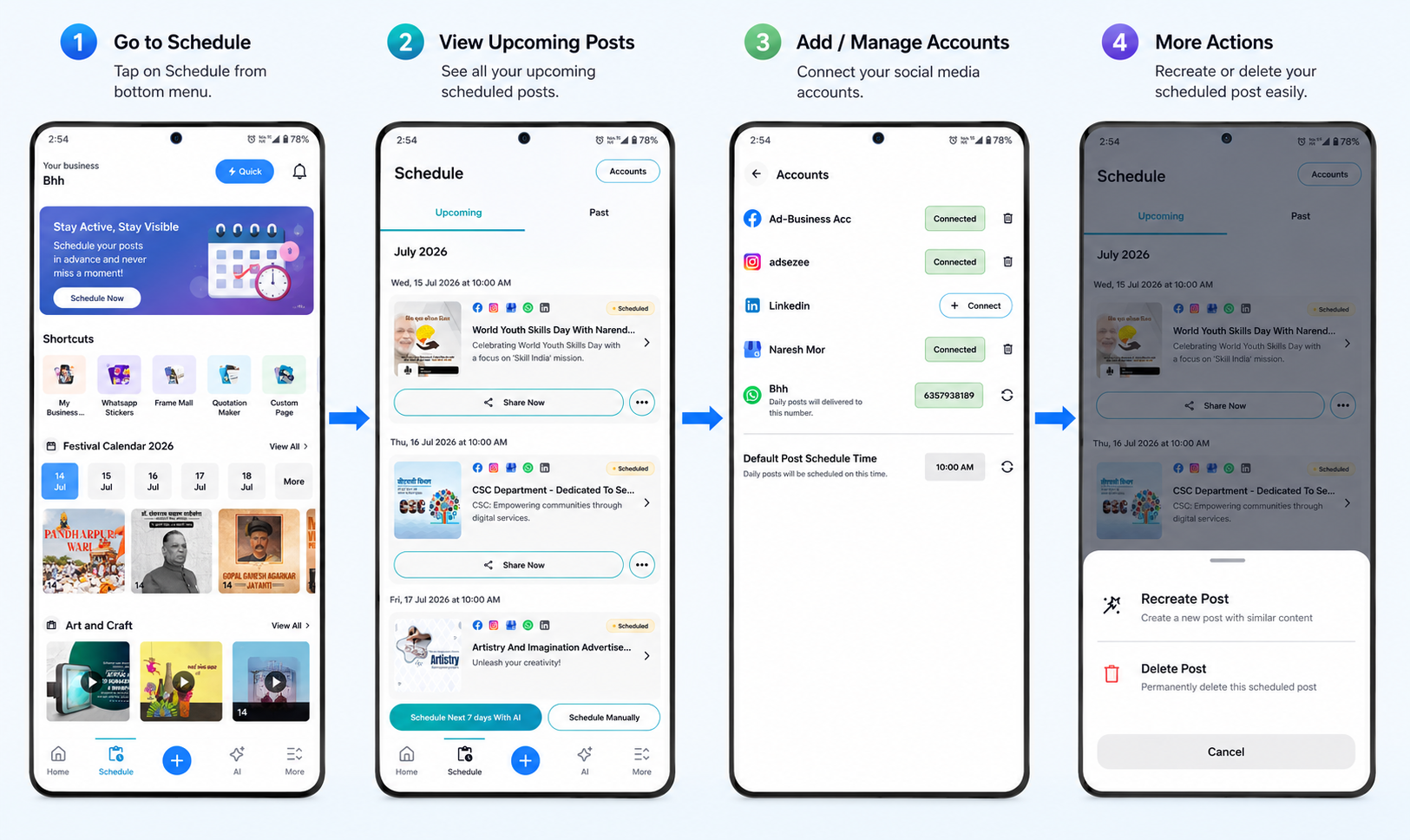
Schedule is a new tab right in the bottom navigation of the Brands.live app — sitting alongside Home and AI — and it’s your business’s complete social media command centre. It has two views:
- Upcoming — every post queued for the days ahead, with its date, time, creative, caption, and target platforms
- Past — a record of everything already published, so you always know what went out and when
But the real headline is the button at the bottom of the screen: “Schedule Next 7 Days With AI.”
One Tap, Seven Days of Marketing: How It Works
Wondering how to schedule social media posts for an entire week with AI? In Brands.live, it takes five simple steps — and less than two minutes.
Step 1: Open the Schedule Tab
Launch the Brands.live app and tap Schedule in the bottom menu. You’ll instantly see your complete social media scheduling calendar for the month, organised day by day.
Step 2: Tap “Schedule Next 7 Days With AI”
This is where the magic happens. Tap the blue Schedule Next 7 Days With AI button, and the built-in AI post generator gets to work — creating a complete, ready-to-publish post for each of the next 7 days. And not just images. For every single day, the AI creates:
- A branded poster relevant to that specific date — special days, festivals, and observances (for example, a “World Population Day” post on 11 July and a “World Paper Bag Day” post on 12 July, each with matching creative)
- A complete caption written for you — engaging, on-topic, and ready to post (like “Let’s use paper bags and contribute to a greener planet…”)
- The schedule itself — each post automatically assigned to its correct date and your preferred posting time
Seven days of content planning, design, and copywriting — done in seconds.
Step 3: Review Your Week
Every AI-generated post appears in your Upcoming list as a clean card showing the poster thumbnail, the title and caption, the scheduled date and time (e.g., “Sat, 11 Jul 2026 at 10:00 AM”), the platform icons it will publish to, and a “Scheduled” status badge. Scroll through the week and see your entire marketing plan at a glance.
Step 4: Don’t Like a Post? Regenerate It
You stay in full control. If any post doesn’t match your taste, simply tap Regenerate — the AI instantly creates a fresh post, and the new design and caption replace the old one. Keep regenerating until every post feels right for your brand. It’s like having a designer and copywriter on standby who never gets tired of revisions.
Step 5: Tap Schedule — and You’re Done
Happy with the week? Confirm the schedule, and that’s it. Your marketing is officially on autopilot. Each post will be published automatically on its assigned day and time across all your connected platforms — while you focus on actually running your business.
And if you ever want a post to go out immediately instead of waiting, every card also has a Share Now button.
Publish Everywhere at Once: Connected Accounts
Auto-pilot only works if it flies to the right destinations — and that’s handled in the Accounts screen (top-right of the Schedule tab). This is where Brands.live becomes a true social media scheduler for multiple accounts, able to auto-post to Facebook, Instagram, WhatsApp, Google Business and LinkedIn from a single schedule. Connect all your business channels once:
- Facebook — connect your business page
- Instagram — link your business account
- LinkedIn — connect with one tap
- Google Business Profile — sign in with Google, pick your business listing, and connect (a “Connected Successfully” confirmation seals it)
- WhatsApp — add your number, and daily posts are delivered straight to it
Each connected account shows a green “Connected” status, and you can remove or re-sync any channel anytime. Connect once, and every scheduled post goes out to all your platforms simultaneously — no separate uploads, no switching between apps.
Set It Once: Default Post Schedule Time
Also in the Accounts screen is a small setting with a big impact: Default Post Schedule Time. Set your preferred hour (say, 10:00 AM — when audience engagement is high), and every scheduled post automatically goes live at that time each day. Consistency, without ever thinking about it.
Prefer Doing It Yourself? Schedule Manually
Next to the AI button sits the Schedule Manually option. Want to plan a specific promotion, a shop announcement, or your own custom creative for a particular day? Pick the poster, date, and time yourself and slot it into the same queue. AI auto-pilot and manual control work side by side.
Why This Changes the Game for Small Businesses
For a shop owner, freelancer, or local brand, this is what makes Schedule the best AI social media scheduler for small business needs:
Zero daily effort, maximum daily presence. Consistency is the #1 rule of social media growth — and the hardest one to follow when you’re busy running a business. One tap a week now keeps your pages active every single day.
AI that knows the calendar. The posts aren’t random. The AI picks up special days, festivals, and observances relevant to each date, so your brand always shows up timely and relevant.
Design + caption + timing, all done. Even the best tools for scheduling social media posts automate only one piece of the puzzle — you still design the creative and write the copy yourself. Here, the creative, the copy, and the publishing schedule are generated together, ready to go.
Every platform, one flow. Facebook, Instagram, WhatsApp, Google Business, and LinkedIn — one schedule feeds them all.
Control when you want it. Regenerate any post, share instantly with Share Now, or switch to manual scheduling. Auto-pilot never means giving up the steering wheel.
| Feature | Traditional Social Media Scheduler | Brands.live Schedule |
|---|---|---|
| Content Creation | Create posts manually |  AI automatically creates branded posts AI automatically creates branded posts |
| Captions | Write captions yourself |  AI generates ready-to-post captions AI generates ready-to-post captions |
| Content Planning | Plan each post individually |  Creates a complete AI content calendar for the next 7 days Creates a complete AI content calendar for the next 7 days |
| Festival Marketing | Search for ideas and design manually |  Automatically creates posts for festivals, awareness days, and special occasions Automatically creates posts for festivals, awareness days, and special occasions |
| Scheduling | Set date and time manually |  AI schedules posts using your preferred posting time AI schedules posts using your preferred posting time |
| Publishing | Schedule posts platform by platform |  Auto-publishes to Facebook, Instagram, LinkedIn, Google Business Profile, and WhatsApp Auto-publishes to Facebook, Instagram, LinkedIn, Google Business Profile, and WhatsApp |
| Multiple Accounts | Limited or requires higher plans |  Manage multiple connected business accounts from one place Manage multiple connected business accounts from one place |
| Content Planner | Separate planning required |  Built-in Content Planner with AI-powered scheduling Built-in Content Planner with AI-powered scheduling |
| Regeneration | Edit everything manually |  Regenerate any AI-created post instantly Regenerate any AI-created post instantly |
| Best For | Social media managers |  Small businesses, local shops, creators, agencies, and marketers looking to automate social media posting Small businesses, local shops, creators, agencies, and marketers looking to automate social media posting |
Frequently Asked Questions
Final Word
Social media marketing used to be a daily chore. With the new Schedule feature in Brands.live, social media marketing on autopilot is a weekly one-tap habit: open the app, tap Schedule Next 7 Days With AI, review, regenerate anything you don’t love, and confirm.
Download Unlimited Festival Posts, Videos, WhatsApp Stickers & Many More

Seven days of branded posts, captions, and perfectly timed publishing across five platforms — on complete autopilot. Your marketing works around the clock, so you don’t have to.
- Get link
- X
- Other Apps
- Get link
- X
- Other Apps
Comments
Post a Comment